
New version 15.64
Simployer Capitech - Version 15.64
This release includes new functionality and a range of improvements, including:
- Absence – Define per absence code whether partial-day absence is allowed
- Absence – Create custom absence warnings
- Flow – Support for concurrent sessions for the same user (e.g. PC and tablet/mobile)
- Shift rotations – Split existing shifts in Operational Plan when rolling out a Shift rotation
- Plan – Changed the English term from Duty to Shift
Read more below for further details on improvements and bug fixes. The release became available to all cloud customers in September 2026.
New functionality
Absence - Partial-day absence per absence code
It is now possible to define for each absence code whether partial-day absence (specific times within a day) is allowed. If this is disabled, it will not be possible to request or register partial-day absence using that absence code; only full-day absences can be registered.
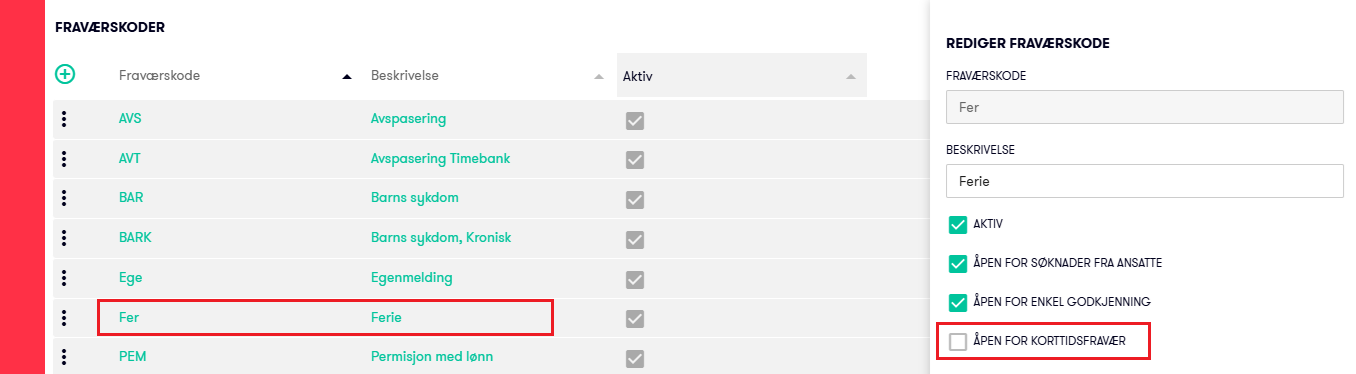
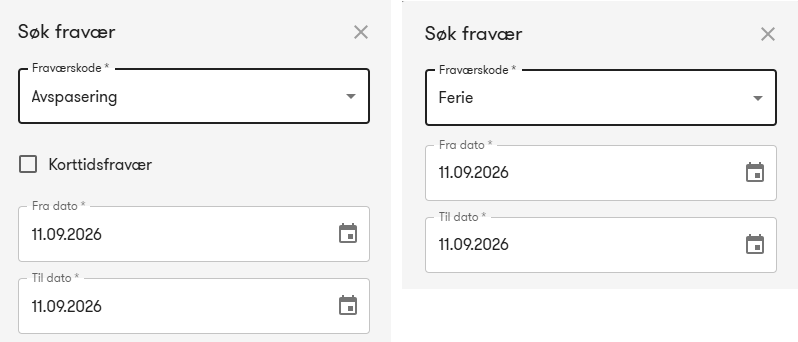
In this example partial-day absence is available when requesting time off, but not when requesting vacation.
Absence codes of the type Vacation will automatically get the partial-day absence option disabled, as vacation under the Norwegian Holiday Act is calculated in days. If there are other absence codes that should not allow partial-day absence, the option can be disabled for the relevant absence codes.
Absence - Custom warnings
In menu Admin - Absence - Warnings, it is now possible to create custom warnings in addition to enabling or disabling the standard warnings. These can, for example, be used as internal guidelines for specific types of absence, such as time off in lieu or special leave days.
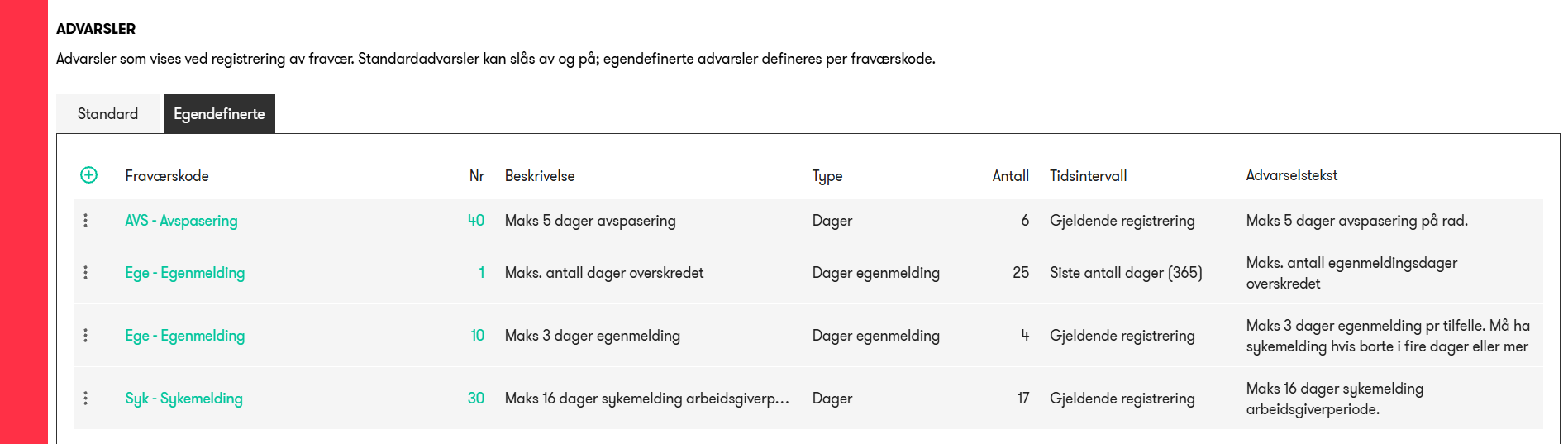
In this example, a warning has been created for time off exceeding 5 days. The text entered in the warning message is displayed to the manager when approving a request or registering an absence using the time off absence code, if the number of days is 6 or more.
Shift rotations - Split shifts in Operational Plan when rolling out a Shift rotation
When rolling out a Shift rotation, it is now possible to enable an option that splits or shortens existing shifts in Operational Planning originating from one or all other Shift roations when they overlap with shifts from the new rollout.
In practice, this makes it possible to roll out shifts for an employee that replace parts of their existing shifts.
For example, an employee normally works from 08:00 to 16:00 in one department, rolled out from Shift rotation A. In a new Shift rotation B, the employee is assigned a short shift every other Thursday from 12:00 to 14:00 in another department to cover a specific need.
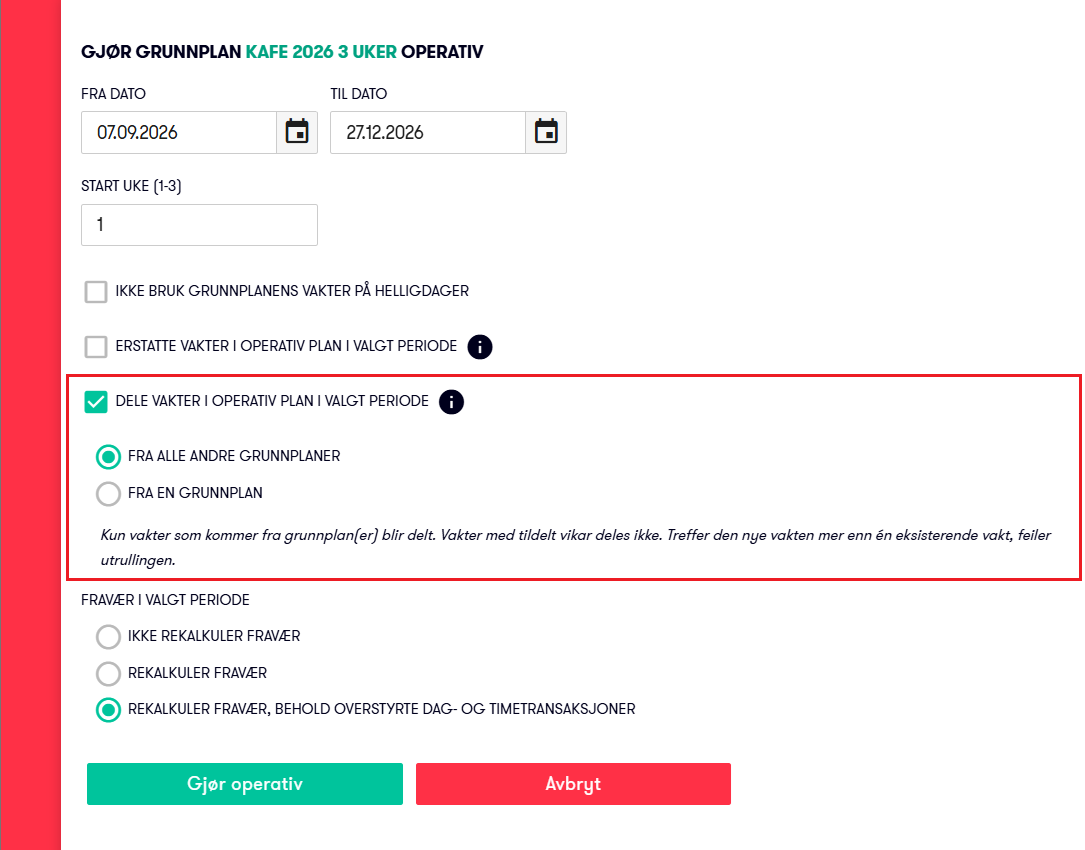
After the rollout, every other Thursday the employee will have split shifts in their original department from 08:00–12:00 and 14:00–16:00, with a short shift in the other department from 12:00–14:00.
Note: This functionality is intended for specific use cases and has its own access control. It can be enabled for the relevant user roles when needed. By default, it is disabled for all users.
Improvements
Flow – Multiple sessions for the same user
It is now possible to log in to Flow on, for example, a PC and a tablet or mobile device and have multiple sessions running simultaneously. Previously, the existing session was logged out when signing in on a new device.
Plan – Changed from Duty to Shift
When using Flow in English, the term for a planned shift has been changed from Duty to Shift. This change applies across Shift rotations , Operational Plan, Time Registration, and other areas.
API – Personnel costs
The getTimetransactionCosts API for retrieving personnel costs for time registrations has been optimized for improved performance.
In one specific test case, the response time was reduced from 63 seconds to 6.8 seconds, an improvement of approximately 89%. Performance improvements will naturally vary depending on the scenario.
Bug fixes
Plan | Shift Swap
Fixed an issue where an approved absence request, where the absence was subsequently deleted or moved, could prevent a shift swap from being completed.
Plan | Display of No Substitute Required
Corrected the display of shifts with the status No Substitute Required when using filters, such as filtering by employee. Previously, shifts with this status were not displayed when filtering by one or more employees. These shifts are now also displayed when filters are active.
Absence | Allow Managers to Register Their Own Absence
Fixed an issue where managers could, in some cases, register absence for themselves even when the client setting was configured not to allow this.
Reports | Excel XLSX Export
Fixed an issue where background colors were not included when exporting to Excel. For example, white text on a red background could appear as white text on a white background in Excel. Background colors are now correctly included in exported XLSX files.
My Capitech | Display of Period Preferences
Corrected the display of period preferences so that they are also shown on Sundays in the My Capitech calendar. Previously, period preferences were visible on all days except Sundays.
Update 15.64.2
- Absence - Filter
Fixed an issue where the absence code filter was reset when refreshing the page or creating/editing an absence. - Operational Plan - Find substitute
Added a new "Assign and open" button that assigns the shift to the substitute and opens it so that any necessary changes can be made. For example, if the shift should have different dimensions or be slightly shorter or longer than the original shift.
Update 15.64.3
- Absence API - Performance
Significantly improved the performance of the absence API. In some situations, certain customers could experience unusually slow response times when loading the Dashboard and/or absence data in Flow and Min Capitech.
- Flow - Microsoft Entra Login
Improved the handling of certain specific error scenarios to ensure stable login.
Update 15.64.4
- Cost API for Hours - Performance
API getTimetransactionCosts is optimized for better performance.