Order
Order is a dimension that can be used when registering time. What an order represents and how it is used may vary between organizations.
Where do you find orders?
You can create and maintain orders here:
Admin - Dimensions - Order
Create a new order
To create a new order:
- Go to Admin - Dimensions - Order
- Click the plus icon in the upper-left corner
- Enter the required information
- Click Save
Edit or deactivate an order
To edit an order, click the order name.
For example, you can:
- change the name
- change other information
- deactivate the order if it should no longer be used
Delete an order
An order can only be deleted if it is not in use.
To delete an order:
- Go to Admin - Dimensions - Order
- Click the three dots to the left of the order
- Click the trash can icon
If the order has been used, you should deactivate it instead.
How to enable orders
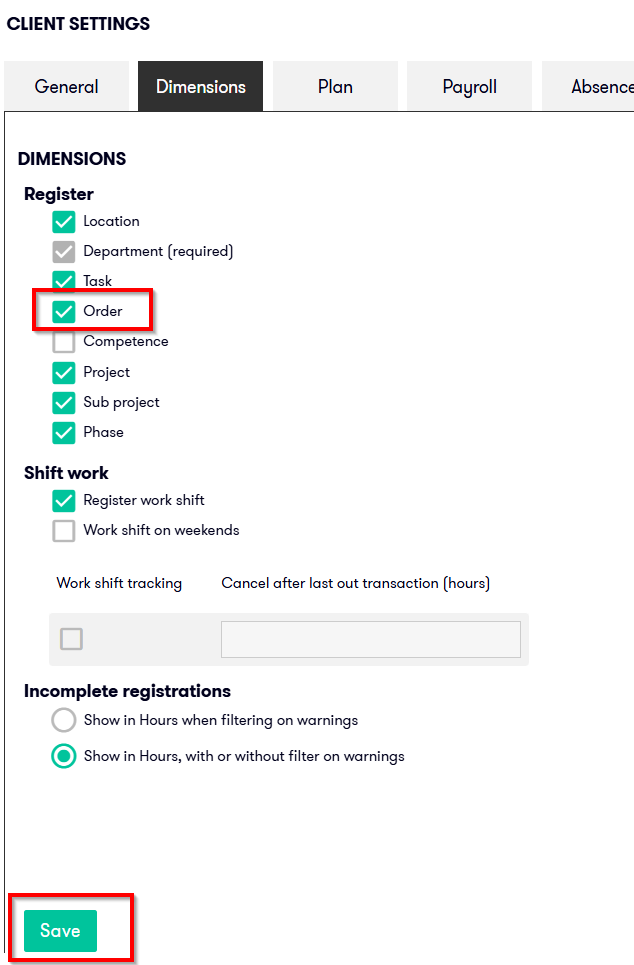
If you cannot find Order under Admin - Dimensions, the dimension is probably not enabled for your organization. Before you can use orders, the dimension must be enabled in client settings.
To enable orders:
- Go to Admin - Client settings
- Open the Dimensions tab
- Find the Register section
- Select Order
- Save the change