
Anonymize employees
What does anonymization mean?
Anonymization means removing personal data so that the remaining data can no longer be linked to the employee as an individual.
This may be relevant when a former employee requests anonymization after their employment has ended.
Anonymization may be carried out for privacy and GDPR purposes.
Important before you anonymize
Anonymization is permanent and cannot be undone.
Before anonymizing an employee, check that:
- the employment has ended
- the employee should be anonymized
- you no longer need the personal data
- you have selected the correct employee
Which information is removed?
Anonymization removes personal information that could link the individual to data in Capitech Flow.
This may include:
- name
- phone number
- date of birth
- national identity number
- address
What data is retained?
Hours, absence, and planning data are retained.
This allows your organization to continue retrieving:
- reports
- statistics
- company and department history
- supporting data that is not linked to the individual
How to anonymize an employee
- Go to Admin > Employee > Employee.
- Open the relevant employee.
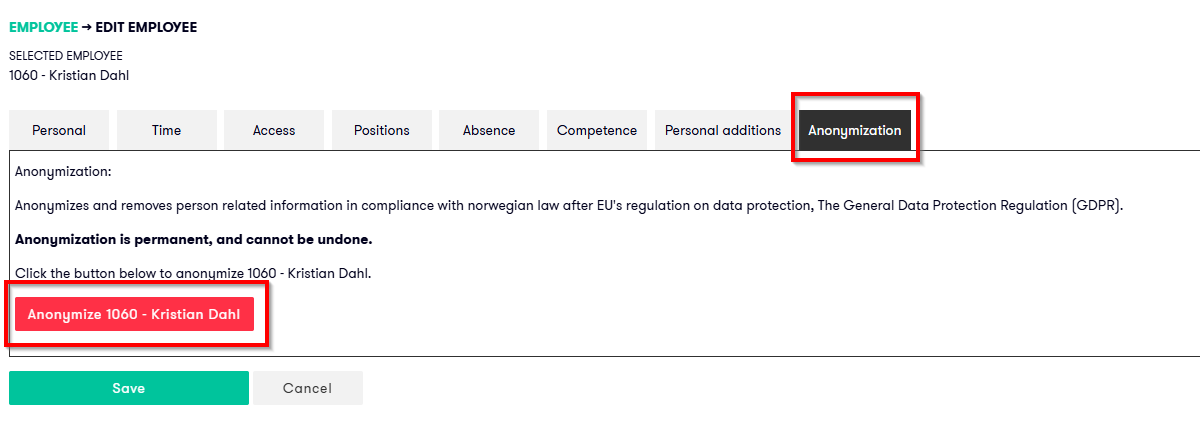
- Go to the Anonymization tab.
- Select the red Anonymize Firstname Lastname option.
- Select OK in the window that appears to confirm.
- Click Save.
Once the changes have been saved, the employee has been anonymized.
Frequently asked questions
Can anonymization be undone?
No. Anonymization is permanent and cannot be undone.
When is anonymization relevant?
Anonymization may be relevant after an employee has left the organization and requests that their personal data be removed.
Personal data should be deleted or anonymized when it is no longer necessary, in accordance with the General Data Protection Regulation